



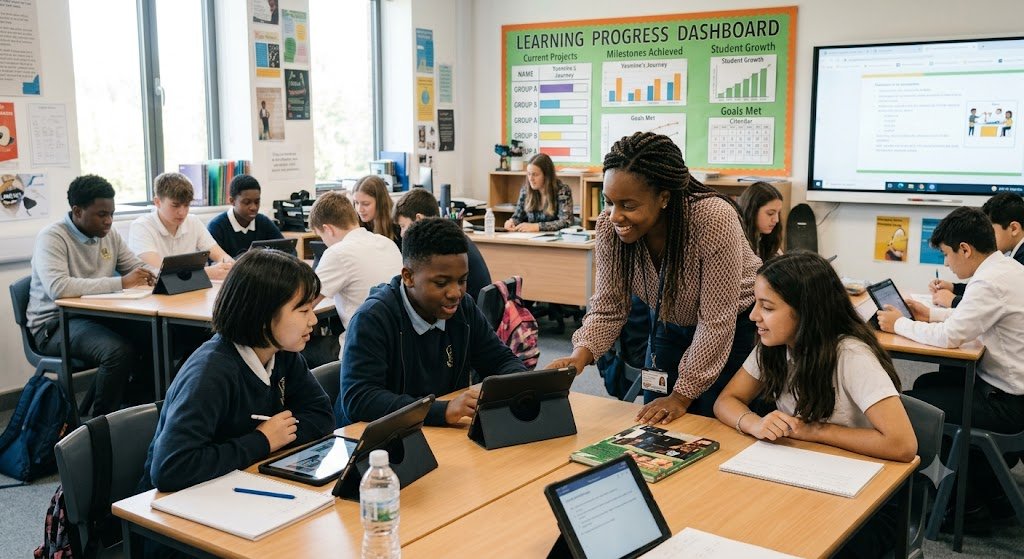
A student in Lagos revises for a physics exam with a tutoring app that notices she keeps confusing velocity and acceleration, then quietly rebuilds her practice set around that exact confusion. A teacher in Manchester spends Sunday evening with his family instead of marking essays, because a grading assistant has already flagged the ten scripts that need his personal attention. A 52-year-old accountant in Toronto retrains for a data analytics role using a course that adapts to the hours she has free after work.
None of these scenarios is science fiction. In 2026, they are ordinary.
AI in education has moved past the hype stage. The question is no longer whether schools, universities, and training providers will use artificial intelligence, but how to use it well. That distinction matters, because the same technology that can personalize learning for millions of students can also mislead them, widen inequality, or erode the thinking skills education is supposed to build.
This article explains how AI is actually being used in education in 2026, the benefits of AI for students and teachers, where the risks lie, and how learners, parents, and educators can get real value from these tools without falling into common traps. Whether you are a student, a parent, a teacher, or a professional returning to study, you will find practical guidance you can apply this week.

What AI in Education Means in 2026
When people say “AI in education,” they usually mean several distinct technologies working in different roles.
Adaptive Learning Platforms
These systems adjust the difficulty, pace, and sequence of learning material based on how a student performs. If a learner masters fractions quickly, the platform moves ahead. If the learner struggles, it slows down, offers alternative explanations, and provides more practice. The core idea, sometimes called mastery-based progression, predates AI, but modern models make it far more precise.
AI Tutors and Study Assistants
Conversational AI tutors can explain concepts, answer questions, generate practice problems, and give feedback in natural language. The better tools in 2026 are designed to guide rather than answer: they ask the student questions, point out where reasoning went wrong, and withhold the final answer until the learner has genuinely attempted the problem.
Teacher Support Tools
These include lesson planners, rubric-based grading assistants, quiz generators, and tools that translate or simplify materials for different reading levels. Their purpose is to reduce the administrative load on teachers so that more time goes to actual teaching.
Institutional and Administrative AI
Schools and universities use AI for timetabling, early-warning systems that flag students at risk of dropping out, enrollment forecasting, and accessibility services such as live captioning and translation.
A useful way to think about all of these: AI in education works best as an amplifier of good teaching and good study habits, not a replacement for either.
Benefits of AI for Students
The benefits of AI for students fall into five practical categories.
1. Personalized Pacing
Traditional classrooms move at one speed. AI-supported learning lets each student spend more time where they need it. A student who needs three extra days on algebraic factoring can take them without holding back classmates, and a student ready to move ahead is not left bored.
2. Instant, Low-Stakes Feedback
Waiting a week for marked homework weakens the feedback loop that drives learning. AI tools give feedback within seconds, and because no human is watching, students often feel freer to make mistakes, ask “basic” questions, and try again. Psychological safety is one of the most underrated benefits of AI for students.
3. Around-the-Clock Access
Learning does not happen only between 8 a.m. and 3 p.m. Students preparing for exams late at night, working adults studying after shifts, and learners in different time zones all benefit from support that is available whenever they are.
4. Accessibility and Inclusion
AI-powered text-to-speech, speech-to-text, live captioning, translation, and reading-level adjustment have made mainstream materials usable for students with dyslexia, hearing or vision impairments, and learners studying in a second language. UNESCO has emphasized in its guidance on generative AI in education that inclusion should be a central goal of any deployment, not an afterthought.
5. Skill-Building for an AI-Shaped Workplace
Students who learn to use AI critically, checking outputs, refining prompts, and knowing when not to use it, are practicing exactly the judgment employers now expect. The OECD has repeatedly noted in its work on education and skills that the ability to work alongside intelligent tools is becoming a core competency, comparable to digital literacy a generation ago.
Quick Comparison: Traditional vs. AI-Supported Study
| Aspect | Traditional Only | With AI Support |
|---|---|---|
| Feedback speed | Days to weeks | Seconds to minutes |
| Pacing | One speed for all | Adjusts per learner |
| Practice material | Fixed sets | Generated on demand, targeted to weaknesses |
| Availability | School hours | 24/7 |
| Risk if misused | Slower progress | Shallow learning, over-reliance |
Notice the last row. AI support is not automatically better. It is better when used deliberately, which is why the later sections on mistakes and expert tips matter.
How AI Supports Teachers
Teachers, not technology, remain the decisive factor in learning outcomes. What AI changes is how teachers spend their limited time.
Reducing Administrative Load
Surveys by education bodies in several countries have consistently found that teachers spend a large share of their working week on non-teaching tasks: marking, documentation, and preparing differentiated materials. AI tools now handle the first draft of much of this work. A teacher can generate three versions of the same worksheet for different reading levels in minutes, then spend saved hours on one-to-one support.
Better Visibility Into Learning
Dashboards built on AI analysis can show a teacher, at a glance, that half the class misunderstood a specific step in a chemistry procedure. Instead of discovering the gap during the end-of-term exam, the teacher can re-teach it the next morning.
First-Pass Feedback, Human Final Say
Grading assistants can apply a rubric to essays and flag issues in structure, evidence, and grammar. The responsible model used in most schools in 2026 is “AI drafts, teacher decides.” Final grades and meaningful comments stay human, both for accuracy and because students deserve to know a person read their work.
AI Beyond the Classroom: Administration and Access
Two developments deserve attention because they affect students who may never notice them.
- Early-warning systems. Universities increasingly use AI models to identify students showing patterns associated with dropping out, such as declining attendance, missed submissions, or reduced platform activity, so advisors can reach out early. Done well, this is quiet, life-changing support. Done badly, it becomes surveillance, which is why transparency about what data is collected matters.
- Language access. Real-time translation and captioning have opened courses to students who previously could not participate fully. A lecture delivered in English can be followed live in dozens of languages, which is reshaping international and refugee education programs.
Real-World Case Studies
The following composite cases reflect patterns widely reported across schools and training providers. Names are illustrative.
Case Study 1: A Secondary School Closes Its Math Gap
A public secondary school introduced an adaptive math platform for two 20-minute sessions per week, replacing generic homework. Teachers reviewed the platform’s weekly gap reports every Friday and re-taught the two most common misconceptions the following Monday. Within one academic year, the share of students below grade level in math fell noticeably, and, just as important, teachers reported that struggling students asked more questions in class because they had already practiced privately without embarrassment. The critical detail: the platform did not replace instruction. It informed it.
Case Study 2: A University Writing Center Scales Up
A university writing center could serve only a fraction of students who requested help. It introduced an AI writing assistant configured to give feedback on structure and argument, but explicitly blocked from rewriting student text. Students had to revise their own work between feedback rounds. Demand for human tutors did not fall. Instead, students arrived at human sessions with better drafts and sharper questions, so tutor time went further.
Case Study 3: An Adult Learner Changes Careers
A mid-career professional used an AI study assistant to retrain in data analysis over nine months. Her routine: study a concept from a structured course, explain it back to the AI in her own words, ask the AI to challenge her explanation, then complete a project without AI help to prove the skill was hers. The pattern, learn, explain, get challenged, perform independently, is a template any adult learner can copy.
Practical Examples You Can Try This Week

For students:
- The explain-it-back method. After studying a topic, ask an AI tutor: “I will explain photosynthesis to you. Ask me follow-up questions and point out anything I get wrong.” Explaining is one of the most effective learning techniques known to cognitive science, and AI gives you a tireless audience.
- Targeted practice generation. Paste a topic you find difficult and ask for five practice questions that get progressively harder, with feedback after each answer, not before.
- The no-answer rule. Instruct the tool: “Do not give me the answer. Give me one hint at a time.” This keeps the struggle, and the struggle is where learning happens.
For parents:
- Ask your child to show you how they use AI for homework. If the tool is doing the work, redirect. If it is coaching, encourage.
- Set a simple family rule: AI can explain, quiz, and check, but first attempts are always done alone.
For teachers:
- Use AI to generate three difficulty tiers of the same exercise, then assign them by readiness rather than giving everyone the same sheet.
- Ask an AI tool to predict the most likely misconceptions for your next topic, then design your lesson opening around addressing them.
Expert Tips for Using AI in Learning
- Treat AI output as a first draft of the truth. Verify facts, especially names, dates, statistics, and citations, against reliable sources. AI systems still produce confident errors.
- Protect retrieval practice. Testing yourself from memory builds durable knowledge. If AI always supplies the answer instantly, you lose the retrieval step. Attempt first, check second.
- Use AI for feedback, not production. The learning value is in the loop: your attempt, its critique, your revision.
- Keep a “no-AI zone.” Whether it is timed practice exams or first drafts, regularly perform without assistance so you always know what you can do alone. Exams, interviews, and real work will demand exactly that.
- Check your institution’s policy before submitting anything. Rules on acceptable AI use vary widely between schools, and even between courses at the same university. When unsure, ask, and disclose.
- Mind your data. Avoid entering personal, medical, or identifying information into tools that are not approved by your school or employer.
Common Mistakes to Avoid
- Outsourcing thinking. Copying AI-written answers produces grades without learning, and the gap becomes visible at exam time. This is the single most damaging mistake students make.
- Trusting citations without checking. AI tools can invent plausible-looking references. Always confirm a source exists before citing it.
- Using one tool for everything. A conversational assistant, an adaptive practice platform, and a flashcard system do different jobs. Match the tool to the task.
- Ignoring the basics. No AI tool compensates for missing sleep, skipped classes, or cramming. AI amplifies good habits; it does not replace them.
- For schools: buying technology without training. Deployments fail when teachers receive tools but no time to learn them. Budget for training, not just licenses.
- For parents: banning instead of guiding. Blanket bans push AI use underground. Guided, transparent use teaches judgment.
Risks, Ethics, and Responsible Use
An honest article about AI in education must address its downsides.
- Accuracy. AI systems generate errors, sometimes subtle ones, and students may lack the knowledge to spot them. This is why AI works best alongside authoritative materials and human teachers, not instead of them.
- Equity. Students with better devices, connectivity, and guidance benefit more. Without deliberate policy, AI can widen the very gaps it promises to close. International bodies, including UNESCO, have urged governments to treat equitable access as a precondition of AI adoption, not a later fix.
- Privacy. Educational AI can collect detailed data about how children learn. Parents and schools should ask vendors direct questions: What is collected? Where is it stored? Who can see it? Can it be deleted?
- Academic integrity. Institutions are moving from pure detection, which is unreliable, toward assessment redesign: more oral defenses, in-class writing, project work, and explicit “show your process” requirements. This shift is healthy because it assesses understanding rather than output.
- Skill atrophy. If AI drafts every email and solves every problem, foundational skills can weaken. The remedy is structural: deliberately practicing without assistance, as described in the expert tips above.
Balanced adoption means holding two ideas at once: these tools deliver real benefits, and they require real guardrails.
Frequently Asked Questions
1. Will AI replace teachers?
No credible evidence points that way. AI handles repetitive tasks well, but motivation, mentorship, classroom management, and judgment about individual children remain human strengths. The realistic future is teachers using AI, not AI replacing teachers.
2. Is it cheating for students to use AI?
It depends on how it is used and what the institution’s rules say. Using AI to quiz yourself or explain a concept is studying. Submitting AI-generated work as your own is academic dishonesty in most institutions. Always check your course policy and disclose use when required.
3. What are the main benefits of AI for students?
Personalized pacing, instant feedback, 24/7 availability, improved accessibility for students with disabilities or language barriers, and practice with tools they will use in the workplace.
4. At what age should children start using AI learning tools?
Most experts recommend supervised, purpose-built educational tools for younger children and gradually increasing independence through the teenage years, always with adult guidance on verification and appropriate use. Follow the age requirements of each tool, since many general-purpose AI assistants set minimum ages in their terms.
5. How can parents tell if an AI tool is helping or harming their child’s learning?
A simple test: can the child explain the material without the tool? If yes, the tool is coaching. If no, it is doing the work. Watching how your child uses the tool for ten minutes usually tells you everything.
6. Do AI tutors actually improve grades?
Results depend heavily on implementation. Studies of well-designed intelligent tutoring systems have shown meaningful learning gains, particularly when tools guide rather than answer and when teachers integrate them into instruction. Poorly used, the same tools can reduce effort and learning.
7. Are AI answers reliable enough to study from?
They are reliable enough to explain concepts and generate practice, but not reliable enough to trust blindly for facts, figures, or citations. Verify anything you plan to repeat in an exam or paper.
8. How is AI helping students with disabilities?
Through live captioning, text-to-speech, speech-to-text, reading-level adjustment, translation, and tools that convert material between formats. These features let many students use mainstream materials independently for the first time.
9. What should schools look for when choosing AI tools?
Evidence of learning impact, clear data privacy terms, teacher controls, accessibility features, alignment with curriculum, and vendor transparency about how the AI works and what data it uses.
10. Will using AI make students lazy thinkers?
Only if it is used passively. Students who attempt work first, use AI for feedback, and regularly practice without assistance tend to strengthen their thinking. The tool is neutral; the habit determines the outcome.
Key Takeaways
- AI in education in 2026 is mainstream, practical, and most effective as a support for human teaching, not a substitute.
- The biggest benefits of AI for students are personalized pacing, instant feedback, constant availability, and accessibility.
- Teachers gain the most from AI when it removes administrative work and surfaces learning gaps early.
- The “attempt first, AI second” habit separates students who learn with AI from students who merely produce with it.
- Real risks exist: accuracy errors, privacy concerns, equity gaps, and skill atrophy. All are manageable with clear policies and deliberate habits.
- Institutions should invest in teacher training and assessment redesign, not just software licenses.
Conclusion
Artificial intelligence has not transformed education by replacing what worked. It has transformed education by removing friction: the wait for feedback, the one-speed classroom, the mountain of marking, and the barriers facing students with disabilities or different first languages. In 2026, the learners and teachers getting the most from AI share one trait. They stay in charge of the process, using AI to sharpen their thinking rather than to skip it.
The technology will keep improving. The habits described in this article, attempting before asking, verifying before trusting, and practicing without assistance, will remain valuable no matter how capable the tools become. That is the real lesson of AI in education: the goal was never smarter software. It was, and remains, stronger learners.
Also Read | How to Choose the Perfect Business Model for Your Personality Type

